What is SMO?

What is SMO? or Social Media Optimization?

Social Media Optimization or SMO is not a tool but it is today’s internet culture. With the Social Media Optimization sites on internet, people have got a good platform to become more social, more interactive and more communicative. What is SMO? Social Media Optimization doesn’t only allow discovering and reading the content and information but also encourages you to share the knowledge what you have. It is no more a one-way process but is a two way communication..

What is SMO?
(You have to Watch this Great Video on Youtube Now!)

How to Implement AMP on Your Website and Get Supersonic Loading Speed

How to Implement AMP on Your Website and Get Supersonic Loading Speed

Page Speed.

How important is it as a ranking factor?

The answer is: A fast loading website is in-friggin’-dispensable. The human attention span is in a downward spiral – no one wants to wait, especially if they are on a mobile device.

How fast do we need to be? Google recommends a page load time of less than two seconds.

There are many popular measures across on-page and technical domains of SEO that help you meet the goal.

However, one of those measures – Setting up Accelerated Mobile Pages (AMP) for the mobile version of a website – is used sparingly.

Why? In a nutshell, going AMP takes a fair bit of time, effort, and funds depending on how big a website is. In the end, it may not even be worth it.

Is it worth it for you to invest in AMP? If the answer is yes, this post will help you with a step-by-step process of effectively setting up AMP for your WordPress website.

Step 1: Choose the right plugin

Plugin options

WordPress offers many plugins for AMP. I have tried a few of them with success to varying degrees. One of them gave marvelous results in the Google Pagespeed Insights for a while. But it broke all my AMP pages on mobile!

My recommendation

I would recommend the AMP for WP – Accelerated Mobile Pages – WordPress plugin. This plugin provides a lot of options to customize mobile webpages. The rest of the post will be about setting up AMP for your website using this plugin.

After you install and activate the plugin, the WordPress dashboard will show the option of opening the AMP version of your website. You will also see the new plugin (AMP) as highlighted in the below image.

implement-AMP-AMP-for-WP

As in the image above, you will see a set of options, we will cover each of them one-by-one.

Lets jump into the settings.

Step 2: Basic setup of the plugin

Website type

Select the option that best represents your business. Select ‘other’ if nothing else matches, you will get an option to type in your website type after that.

Where do you need AMP?

Select where you want to implement AMP. When you go for AMP, you are deciding to keep your mobile web pages almost completely HTML. You need to let go of the CSS/JS codes that reduce the load speed.

The downside to that is, the user experience (UX) gets impacted. For instance, you can no longer have a call-to-action (CTA) button that swivels to attract a visitor’s attention. AMP cuts out that code, thus saving on page load time. This may eventually result in a reduced engagement rate.

In the above list, you may want to choose to have AMP on your pages, or posts, or both.

Design and presentation

implement-AMP-design-and-presentation-setup-your-logo

Here, you can Setup Your Logo, the recommended size is 120 x 90 pixels. I would recommend not using the logo as it adds to page load time. If no logo is updated on this panel, the AMP page will only have the website name in place of the logo.

The Global Color Scheme option will help you pick a color for your AMP pages that appears on the CTA links on the page, and on the footer link.

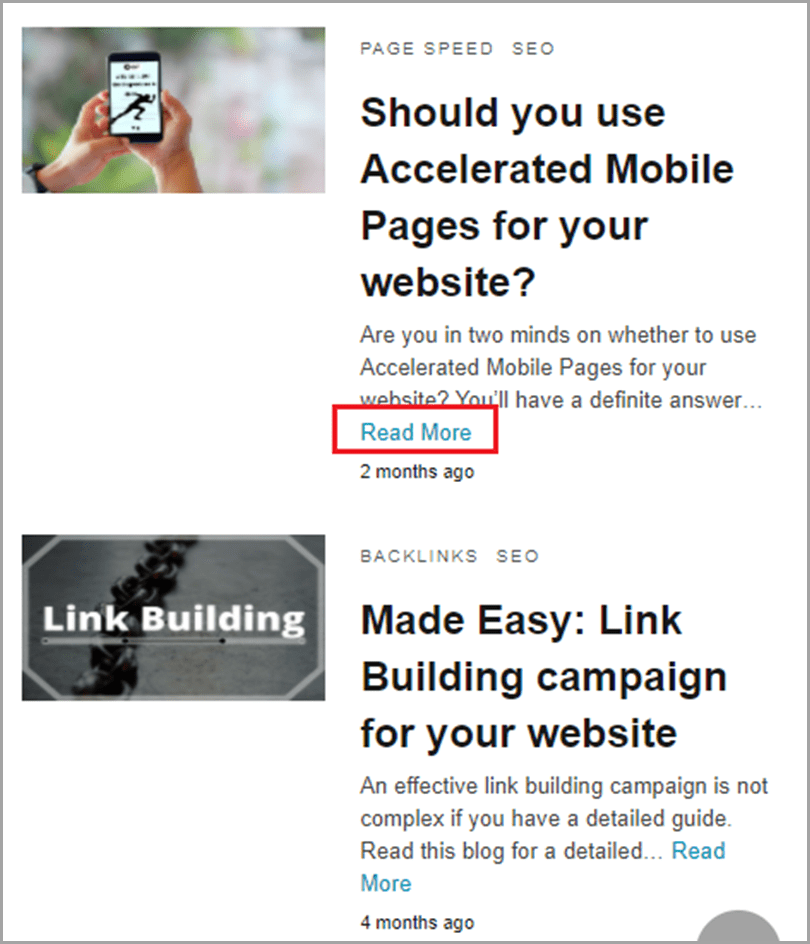
For instance, I chose light blue as my Global Color, as seen in the image below.
implement-AMP-global-color-scheme-read-more

Analytics tracking

implement-AMP-setup-analytics-tracking

In this option panel, you can enable the tools that you use for tracking. For instance, you can enable Google Analytics by adding the Tracking ID. This way data from the AMP pages will get updated directly in your Google Analytics account.

Similarly, you can add multiple other tracking tools as listed in the image above.

Privacy settings

implement-AMP-privacy-settings-cookie-notice-bar-gdpr

The Cookie Notice Bar enables you to seek consent from visitors for the cookies you are using on the website. In the below image, the dialogue box in black is a cookie notice bar.

implement-AMP-monster-insights-hello-world

Image Source – Monster Insights

If you or your audience base is from a GDPR country, you need to turn on the settings for GDPR – General Data Protection Regulation.

Please note, if you have to choose, you can choose only one of the two options, not both.

Advertisement

implement-AMP-advertisement-amp

In this segment, choose where you want to position your Advertisements. You can customize as per need – you can have Ads published sitewide or on single posts, or headers among other options.

implement-AMP-advertisement-positions

You can choose the Ad type, Ad size, and Data Ad Client and Data Ad Slot from the Adsense Ad Code.

3rd party compatibility

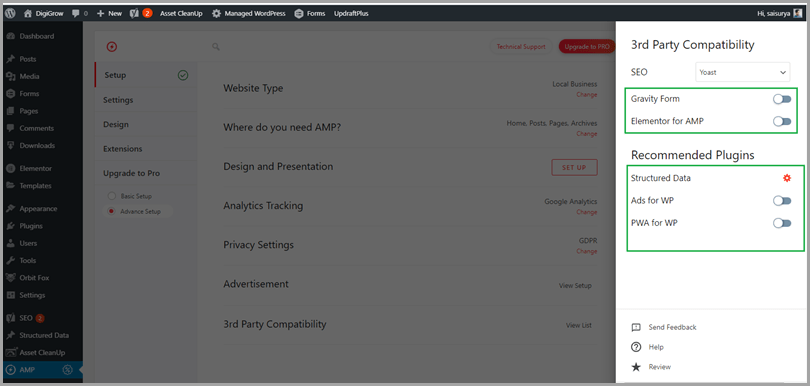
The last entity captures the list of plugins that you need AMP compatibility for.
implement-AMP-wordpress-3rd-party-compatibility

Gravity Form and Elementor for AMP require you to pay for extensions. Structured Data, Ads for WP, and PWA for WP are free plugins. The last three shall be covered in a bit more detail later in the post.

Step 3: More AMP settings

General Settings

implement-AMP-wordpress-general-settings
implement-AMP-wordpress-general-settings-2

The General tab covers the options we covered in the basic set-up. In addition, you get to choose if you want to have AMP on archives, category, and tags pages.

Enabling the last option – AMP Takeover (Beta) – will cause your desktop and mobile version to be the same. This means, your desktop version will also have AMP pages.

I would recommend keeping this option off. Page load is usually better on desktop than on mobile. Having AMP on desktop means trading off UX for a small increment in Page speed. Not a good bargain.

Advertisement

This section has the same options as the Advertisement section in the basic setup.

SEO

implement-AMP-SEO

If you choose to turn on Meta Description, the text you fill in the Head Section will be picked up by Google. This will be different from the text you filled in for the desktop version. I would recommend keeping the setting off, and keeping the Meta Description consistent across the two versions.

OpenGraph Metadata tags are snippets of code that control how URLs are displayed when shared on social media. This section is visible for the desktop version when you are setting up Title and Metadata in your SEO plugin. Below is an example of the Yoast SEO plugin.

implement-AMP-yoast-seo

You can find it by going to the Editor section of any post or page, scroll to the bottom. Once you see the section for Yoast, click on the ‘Social’ tab, then you can choose the social media platform of choice.

The AMP plugin allows you to select the SEO plugin of choice on the same option panel. In the above example, Yoast is the plugin chosen. All the data you enter into Yoast for the Desktop version gets copied into the AMP version.

implement-AMP-advance-setup

You will see the option to Remove Paginated Pages Indexing and URL Inspection Tool Compatibility.

Paginated pages should be indexed but only as canonical. I would recommend keeping this setting off.

URL Inspection Tool Compatibility fosters a more transparent search for you. It provides detailed reports on crawl, index and serving information in your Google Search Console account. I would recommend keeping it turned on.

Elementor Support

implement-AMP-elementor-support

The option of AMPforWP PageBuilder will let you build individual pages for the AMP version, different from the desktop version. It is useful when you want to have slightly different text or CTA for AMP pages.

For example, if you have a ‘Contact Us’ CTA for desktop but you would rather the mobile visitors to call you, you can activate this option and create a separate page.

PWA

implement-AMP-settings-PWA

As per AMP for WP Plugin’s description – Progressive Web Apps (PWA) transforms your website into a web application and gives visitors a native mobile app-like experience.

It is a design enhancement. Activating the module is a matter of choice.

Performance

implement-AMP-performance-enhancement

The Performance panel delves deeper into page speed optimization.

It enables you to Minify CSS/JS to reduce bandwidth usage without impacting UX or functionality. Leverage Browser Cache enables you to speed up load time for returning visitors. I would recommend keeping both the options turned on.

Enabling Optimize CSS will trigger the tree shaking feature of optimizing CSS. You can keep it turned on in case you don’t have a different plugin that already does that job.

Analytics, Structured Data, Notice Bar and GDPR

These sections have the same options as those covered in the basic setup.

Push Notifications

implement-AMP-push-notifications

In case you want to set-up push notifications, you can opt for one among OneSignal, iZooto and Truepush.

In the above example, I have selected OneSignal. However, for any selection, you will see a section to enter the APP ID, an option to enable push notifications for Pages. In addition, you need to choose where you want to position the notification (bottom of the page for example), and what text you want to display.

Contact Forms

implement-AMP-contact-forms

This enables you to choose one of the 3 plugins to optimize AMP for – Contact Form 7, Gravity Forms, and Ninja Forms.

All three require you to pay for an extension. In case your CTA is focused mainly on forms, it is prudent to invest in the extension.

Comments

implement-AMP-comments

This screen lets you choose where you want the user-generated comments to show on your website. You can also choose the sources to display comments from.

Choose the settings that work best for you.

Instant Articles

implement-AMP-instant-articles

Instant Articles is a feature on the Facebook App for mobile users that lets you host your website articles.

The benefit of turning this feature on is an even faster load time compared to having the same article on your website. Since the article loads within the App, you get up to 10 times faster load speed.

However, since the content stays on Facebook, you might lose out on some website traffic. It’s a trade-off between page-speed and website traffic. I would recommend keeping it off.

If you choose to keep it on, you will see the below settings.

implement-AMP-instant-articles-facebook-instant-articles-setup
implement-AMP-instant-articles-facebook-instant-articles-setup-2


After entering your Facebook Page ID, you can customize the article settings. A setting that requires more explanation is – Crawler Ingestion.

When the link of your article hosted on your website gets shared on Facebook, Facebook crawlers look for the ia:markup_url tag. If it’s present, Facebook ingests your article and creates an instant article on your Facebook page.

Tools

implement-AMP-tools

The Individual AMP Page option lets you choose if you want to show the AMP pages by default or not. When you choose Show by Default, all your pages will show the AMP version. However, you can choose to hide AMP for individual posts or pages.

To do that, go to any page and click on Edit Page. In the Settings tab toward the right, you can find the option of turning it off.

implement-AMP-home-settings-show-amp-for-current-page-bar

Similarly, you can choose to Hide the AMP versions for selected categories and posts.

Query Monitor is the developer tools panel for WordPress. If you are a developer, who needs to see the queries on the page, you should keep the setting turned on.

Advance Settings

implement-AMP-advance-settings

The Advance Settings option panel has a host of settings most of which are self-explanatory.

I would recommend keeping the default settings turned on unless you are a WP developer or have hired an expert to design your website.

eCommerce

implement-AMP-e-commerce

If you own an online store, you can customize your AMP version for WooCommerce. If you primarily sell digital assets, you can turn on the Easy Digital Downloads Support option. Both the options require you to enable a paid extension.

Translation Panel

implement-AMP-translation-panel

This panel enables you to select the right translations for a commonly used set of words into the language of your choice.

For instance, you need to type in the translation for the View Non-AMP Version suited to your audience.

For multilingual translations, you can turn on the Use POT file method of Translation. POT (Portable Object Template) file is a template for the PO files. They are plain text files that contain the translations. Each language has its own file extension. For instance French has po.fr.

Step 4: Design

Themes

implement-AMP-design-themes

Just like for the desktop version of your website, you can pick a theme for the AMP version.

There are four free options to choose from.

  • Design One
  • Design Two
  • Design Three
  • Swift

In addition, every page and post has a section that enables you to create your own design.

Here’s how you can find it. Go to the page or post, and click on ‘Edit Page’ in the top toolbar. Scroll down to see the below screen.

implement-AMP-page-builder

If you select the Use Builder checkbox, the template you create will be shown, if not, the free template you select will be shown.

In case you are building your own template, you have the below modules to choose from.

implement-AMP-use-builder-columns

Remember, AMP is basically an HTML page. You can not get much customization or fancy buttons.

Please note: You have to select a theme. The plugin needs it to pick icons and structure – even when you create your own design.

Global

This option panel lets you customize your AMP version.

implement-AMP-global-color-scheme-typography

You can select the colors of choice as above. In addition, you can select Google Fonts. However, I would recommend keeping it off as Google Fonts increase the load time, defeating the purpose of AMP.

implement-AMP-general

Further on, you can choose to keep Sidebar and Infinite Scroll on if that’s what you want your webpage to look like. However, from a page speed perspective, you should keep it off.

The Font Icon Library will be the same as the theme you had chosen at the beginning of the Design panel.

Header

implement-AMP-header-design

The Header options panel, lets you decide the layout of your header and how your navigation menu should look.

implement-AMP-header-settings

It also lets you add a Call Now Button. It’s a useful button for mobile users.

implement-AMP-call-now-button

You may choose to show your Non-AMP link in the Header. However, if your audience is not technically SEO oriented, they may not click on the link.

You can also enable the Search bar. It’s beneficial if you have a blogging website.

implement-AMP-advance-header-options

The Advanced Header Option enables you to get more specific with your header section settings. It’s a matter of choice. However, keep in mind not to add to the code, as it will negatively impact the page load speed.

Homepage, Single, Footer, Page, Social Sharing, Date and Misc

These option panels, just like the header, are completely a matter of design choice. You can choose any settings that suit you the best.

Summing up

The above steps will help you implement AMP effectively on your website. Once you have saved the changes, check out the AMP version on your phone, or, by appending ‘/amp’ after the URL.

The below images capture the features of your AMP page.

AMG PAGE VISUAL

implement-AMP-page-visual

FOOTER

implement-AMP-footer

There you have it. Follow these steps to have error free, superfast pages that load in less than 2 seconds for mobile phone visitors.

Guest author: Sai Kalki is a Digital Marketing Consultant specializing in SEO. He is the founder of DigiGrow, and has helped small businesses grow their business through SEO, PPC and Instagram Marketing.

The post How to Implement AMP on Your Website and Get Supersonic Loading Speed appeared first on Jeffbullas's Blog.


source https://www.jeffbullas.com/how-to-implement-amp-on-your-website/

The 7 Best eCommerce Platforms to Start an Online Store in 2021

The 5 Best eCommerce Platforms to Start an Online Store in 2019

The eCommerce industry is flourishing across the globe.

Similar to the previous years, business owners were expecting a steady growth in the eCommerce industry in the year 2020. With the unprecedented arrival of COVID-19, the eCommerce market saw a boost like never before.

Additionally, stats are predicting that the COVID-19 pandemic has accelerated the shift away from in-store shopping to digital shopping by nearly 5 years. While the demand for grocery, fitness products, electronics, and other home essential items has increased. Product categories like jewelry and travel have seen a decline in sales.

Here are categories that saw an increase or decline in sales in 2020:

Image Source: IBM

Considering the steep growth in eCommerce, business owners are motivated to launch their ecommerce business.

However, starting an eCommerce store is more than simply buying a domain and choosing a hosting partner. Picking the right business niche, technology platform, better customer service, and marketing strategies, all contribute significantly to the success of an online store.

In this post, I’ll share with you which business niche to start, how to choose the right technology partner, and the marketing strategies that will help your eCommerce store grow.

Online eCommerce businesses that you can start in 2021

Online Grocery Industry: The pandemic has reshaped grocery buying behavior. According to research by the emarketer website, in 2020, the online grocery industry noticed the largest ever increase (53%) in online sales and by 2023, online grocery sales will make up 10% of total grocery sales. Starting an online grocery store is probably the best business idea in 2021.

Online Food Delivery Industry: The online food ordering and delivery trend is certainly overtaking the trend of the traditional phone ordering service. As per the stats shared on the CNBC website, online delivery is currently representing 43 percent of all delivery orders and investment firm Cowen is forecasting a massive 79 percent surge in the total U.S. food home delivery market over the next 5 years.

A comparison chart of the online food delivery market with the offline food delivery market.

Online Food Delivery Industry for Ecommerce Platforms

Image Source: Mckinsey

eLearning Industry: The pandemic has doubled the growth of the eLearning industry. The trend of virtual learning and teaching continues to grow as schools and colleges are still shut down across the globe. The eLearning industry will reach $243 billion by 2022. You can learn new courses and consult with professionals such as Teachers, Native language Speakers, Fitness trainers, etc. while sitting in the comfort of your home or office. Undoubtedly, the eLearning industry is the future and offers a plethora of business opportunities for budding entrepreneurs.

Online Fashion and Luxury Industry: Growing at 6-8% a year, the online luxury goods industry is expected to reach €390 billion globally in sales by 2025. The growth of the fashion and luxury market is especially emerging in Asian countries. China is the fastest growing region in this market and India’s fashion and luxury market is expected to cross $30 billion by year-end.

Health Supplements Industry: Due to the scare of COVID-19 and the effect it has on the immune system, people have been taking health supplements to keep their immune system strong against the virus. As per the stats, the health supplements industry is growing at a CAGR of 7.4% and is projected to reach USD 29.40 billion by 2027. So being an entrepreneur, investing in an online health supplement business will be a profitable business idea.

Online Liquor Delivery: The preference of products consumers purchase online has changed considerably in the last year. The online sales of liquor have been one niche that has been untapped for many years but due to the lockdown, the sales have skyrocketed on online channels. According to statistics released by the U.S. Department of Commerce, consumers spend around $54.1 billion on the purchase of alcoholic beverages.

However, these business models are not the end of the world. There are many other business models that you can consider to start, like an online rental business, car booking website, or on-demand services marketplace. Choose your business niche with extreme caution as the dream of a successful eCommerce business begins with the choice of the right niche.

Influencing factors that persuade shoppers to shop online

Shoppers from all around the world have been shopping online for most of their products. Google conducted a study in the 4 major countries where the eCommerce sales are high. Top reasons for shopping online were:

  • Omni-channel Experience – Modern buyers are not limited to buying from one channel, they want an all-round experience. Businesses must provide a seamless connection between different channels, where customers can buy products online and return them in-store.
  • Fast Shipping – Consumers in the U.S. are much more interested in fast shipping times than in-store pickup.
  • Mobile Payment (UPI Enabled) – Quick and easy access to mobile devices along with slashed data prices have brought digital payments to the forefront of retail transactions, especially in the case of UPI. This is also evident from the fact that the number of merchants accepting them has increased to over 10 million in a short span of two to three years.
  • Discounted Prices – Incentivize repeat visits with promos and coupons. While U.K. consumer habits are related to their U.S. counterparts, they are more inclined to buy from the same store twice.
  • Testimonials – Brazilians value product reviews from other customers nearly 2X as much as shoppers in the U.S. or U.K., so make sure they can find reviews on the top of the product page.
  • BOPIS & Curbside Delivery – As per stats, Buy Online and Pick up in Store (BOPIS) sales have increased by 259% during the pandemic. Also, 60% of users prefer to use curbside pickup options for their online orders.

The best eCommerce platforms to start an online business in 2021

#1. Shopify

Shopify is a Canadian company that started in 2006. It is one of the most popular eCommerce platforms in the market. Starting an online store with Shopify is very easy because you can set up your online store successfully in just 15 minutes without the help of any web developer. Shopify is undoubtedly the best eCommerce platform in 2021.

Shopify Pros:

  • Shopping stands high in terms of multi-selling channels. You can easily integrate your store with Facebook, Instagram, and Amazon.
  • A website built in Shopify usually has a fast loading speed.
  • Shopify helps you build a responsive design website and also offers Android and IOS user mobile apps.
  • The platform offers guest checkout, one-page checkout, and a one-step checkout option.
  • Dropshipping, free SSL certificate, and 24/7 support are some of its other most popular features.
  • There is quite a good number of premium Shopify themes and Shopify Experts to jumpstart your eCommerce store.

Shopify Cons:

  • You have to pay a transaction fee for every sale.
  • Not a good option to start a multi-vendor marketplace.

Pricing:

Shopify offers 3 monthly packages starting at $29, $79 and $299 with 2.9% + 30¢ per online transaction. For more details on pricing, visit: https://www.shopify.in/pricing

#2. Bigcommerce

Bigcommerce is also a Saas based eCommerce platform and is a direct competitor of Shopify. The platform was founded in 2009 and now has thousands of online stores running on their platform. The platform is known for its high-end features and low pricing.

Bigcommerce for Ecommerce Platforms

Bigcommerce Pros:

  • No transaction fee.
  • Upload an unlimited number of products.
  • Responsive design and search engine friendly.
  • A number of payment gateway options.
  • You can integrate your online store with Amazon, Instagram, and Facebook

Bigcommerce Cons:

  • As written on many third-party sites, Bigcommerce customer support is not that effective.
  • Limited free themes and templates.

Pricing:

As Bigcommerce doesn’t have any transaction fee, the platform charges you as your store grows and you need to upgrade it. BigCommerce monthly package starts at $29. For more details, visit:  https://www.bigcommerce.com/pricing/

#3. YoKart

YoKart is a popular eCommerce platform that allows you to start a multi-vendor website like Amazon, Etsy, or Alibaba, at a reasonable cost. If you want to start any kind of multi-vendor stores such as a grocery multi-seller store, retail store, fashion store, or a sports marketplace, YoKart is the best eCommerce software in 2021.

YoKart for Ecommerce Platforms

YoKart Pros:

  • The platform is specifically designed to build an online multi-seller or multi-vendor marketplace.
  • Mobile Apps, responsive design, and sleek user interface.
  • Pre-integrated with popular APIs such as QuickBooks, Stripe Connect, Taxjar, ShipStation, etc.
  • One-time payment means no recurring fees.
  • Fully customizable and scalable
  • Free demos, FAQs and 12 months of free technical support.

YoKart Cons:

  • No Free themes and addons
  • Partially encrypted framework

Pricing:

YoKart is a licensed based solution which means that unlike other solutions, business owners don’t need to pay monthly or yearly charges. The packages start at $999. Visit here for more details: https://www.yo-kart.com/multivendor-marketplace-packages.html

#4. Woocommerce

30% of total online stores are powered by Woocommerce with 1M+ download. Popular among the masses, Woocommerce is a WordPress toolkit provider to extend the experience. For people who are already using WordPress, Woocommerce is free, but the hosting and extension that comes along is not entirely budget-friendly.

WooCommerce Pros:

  • Free and easy to use platform
  • Wide variety of themes and plugins
  • Search engine friendly
  • Easy to customize
  • Secure platform

WooCommerce Cons:

  • Premium themes are costly
  • Scalability and support is a major issue.
  • Not a suitable platform to start a multi-vendor marketplace

Pricing:

Woocommerce is free, however, you will have to pay for hosting and domain registry. Also, there can be an additional cost, if you opt for paid themes and plugins. Visit here for more details: https://woocommerce.com/features/

5. Quick eSelling

Quick eSelling is a SaaS eCommerce software that allows businesses to start an online store for free. The platform offers a wide range of features and comes with a single CRM for web and apps. The platform is used by 5000+ businesses to build their online stores.

Quick eSelling Pros:

  • A free solution for website and mobile app set up
  • Multiple payment options
  • Customizable user interface
  • Integrated with Tax & Shipping management APIs

Quick eSelling Cons:

  • The free plan comes with 5% transaction fees
  • Limited themes and addons

Pricing:

Quick eSelling offers a free plan that allows business owners to create a website and mobile app. Also, there are 3 paid plans in-case you don’t want to pay transaction fees. For more details, visit: https://www.quickeselling.com/solutions/pricing-us/

#6. Magento

Magento is a popular open source eCommerce platform launched in 2008. If you want to start a large scale enterprise, Magento is one of the best options you have. Magento is a huge community with lots of benefits.

Magento for Ecommerce Platforms

Magento Pros:

  • Mobile Apps, Responsive Design, and Highly Secure.
  • Customizable and Scalable.
  • Multi-Language and Multi Currency.
  • You can integrate your store with Facebook, Instagram, Ebay, and other platforms.
  • Easy checkout pages like guest checkout, one-page checkout, and one-step checkout options.

Magento Cons:

  • High in pricing especially not an ideal choice for small merchants.
  • Programming skills required to maintain a Magento store.

Pricing:

The Magento basic version is free; however, the Enterprise version can cost you a minimum of $20,000 per year. For more details, visit here: https://magento.com/products

#7. Prestashop

Prestashop is also an open-source eCommerce platform and thousands of web-based online stores have been built in Prestashop. The platform was designed to meet the needs of small and medium-sized enterprises.

Prestashop for ecommerce Platforms

Prestashop Pros:

  • A free solution.
  • User-friendly interface.
  • Mobile and Search Friendly.
  • Guest Checkout and One Page Checkout.
  • You can connect your Prestashop store easily with Facebook, Amazon, and Rakuten.

Prestashop Cons:

  • No official customer support team.
  • Need above basic development skills to work on the platform.
  • You need to pay heavily to convert your eCommerce store into a marketplace.

Pricing:

Prestashop is totally free. The free version is only a basic solution, so you need to buy additional modules that cost between $50 and $150 per module on average. More details can be found here: https://www.prestashop.com/en/prestashop-ready/pricing

Final words

Every eCommerce business has different requirements, so finding a perfect ecommerce platform in 2021 for your business, calls for a lot of time-consuming analysis. From the above list, you can choose the best eCommerce platform according to your business needs, technical acumen, and budget.

Guest author: Ankush Mahajan works as marketing manager at FATbit Technologies, one of India’s leading custom software development & ready-made e-commerce solutions company. His expertise lies in branding and formulating marketing strategies for businesses in a number of industries. Follow him on Twitter: https://twitter.com/ankushmahajann

The post The 7 Best eCommerce Platforms to Start an Online Store in 2021 appeared first on Jeffbullas's Blog.


source https://www.jeffbullas.com/top-ecommerce-platforms/